
Lux FinTax
Update 10/09/2026
General
- Workflow redesign
- Cleaner and more streamlined Optimiser Checklist questions
- Improved workflow structure on the Documents page, with new phases for Compliance, PBC & Digital Signature.
- Digital Signature (DocuSign)
- Enable the Docusign plugin in the new DSS plugin in the Cloud menu
- If selected in the Optimiser Checklist, a new integrated digital signature service becomes available in the Digital Signature folder. This allows Caseware letters and other PDF documents to be sent for signature via DocuSign.
Financial statements
- Improved presentation and logic for the Consolidated Balance Sheet and Profit and loss/ by Compartment note
- Bold formatting is now included in dynamic tables, allowing totals and main captions to be highlighted more clearly.
Tax
- 🆕All tax forms (205, 500, 506a, 800, 900 & VAT) and appendices are now also in available in French
- Draft version 2026 of the tax forms are added
- exports to XML and PDF are disabled until the new XML schema and forms for tax year 2026 are provided by the ACD
- Form 205 Transparent entities
- additional infolabels added
- Form 500
- Quickstart via XML import improved
- Associated companies and Controlled Foreign companies are added to the Form 500 PDF export
- Tax provision computation
- NWT calculation is improved so it also takes the CIT reduction and the special 5 year reduction into account
- Additional rows were added to the computation related to tax consolidation regime
- Lay-out improvement and added a printing menu
- An additional confirmation for deletion was added to avoid accidental removal of records
- Roll forward actions improvement
Bug fixes
- Resolved an issue where records were not updated correctly when using the Reapply button in the Central Relations section.
Monitor(+) update 4/06/2026
We recommend clearing your cache and refreshing the page before testing these new features.
Sign-off workflow improvements
It is now possible to display customised sign-off roles in Monitor(+) columns. These customised roles can be added at both file level and template level in Lux Audit files.
In addition, two new icons have been adopted from the Cloud file. These icons indicate when not all prepare  and review
  roles have been signed off.
Compact Excel export
The addition of this feature makes it possible to display the sign-offs from Monitor(+) columns in a simplified manner.
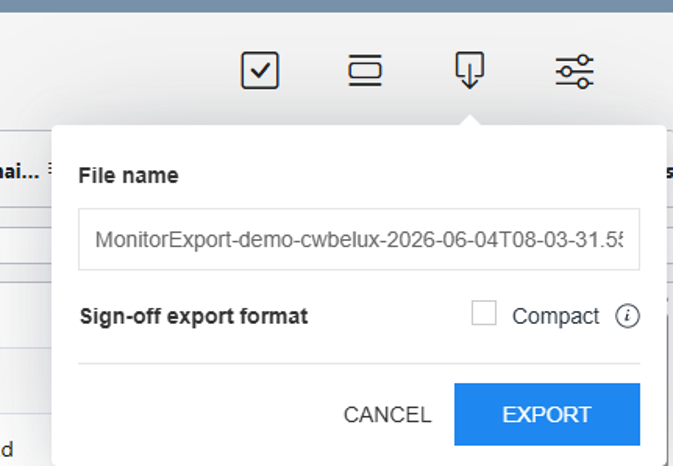
By ticking the “Compact” box, only the highest sign-off level will be displayed in Excel. In addition, as of today, it is possible to customise the name of the Excel file.
If you do not wish to use the compact export, you can still use the original export by simply clicking on “Export” and unchecking the box. This will display all sign-off statuses in the Excel cell, as well as the initials of the person signing off (only for standard Monitor columns) and the date on which the document was signed off.
Update 21/05/2026
Lux Fintax Settings
- Added built-in validation checks to warn users when the input or format is invalid.
Entity Information
- Added a new section under Financial Statements: print and view options: Publications of the board members, statutory auditor and allocation of the result
Financial Statements
- Publications of the board members, and/or statutory auditor and/or allocation of the result can now be included as the final page of the Financial Statements when selected in the Entity information.
- Bug fix
- Resolved a print issue where a blank page appeared in the General information note
eCDF Financial Statements
- Added an additional diagnostic warning when exporting the XML file if the Agent details have been modified.
- Improved the design of the warning pop-up window displayed when attempting to export an invalid XML file
Tax
- Tax return changes 2025 and its appendices are updated
- Export to XML of form 500 is available
- Form 506a layout changes implemented
- Diagnostics have been updated
- General indications - Shareholders
- Export PDF Form 500: all records of the Shareholders are included at the end of the PDF with mention of the tax codes
- Dividend distribution :
- the automated calculations are linked to a manual input field (instead of the movement of the Reserves on the balance sheet)
- this amount is checked with the Allocation of the results (in the Financial Statement and/or Minutes)
- Additional PDF appendix : Shareholders with more than 10% holding during the financial year but no no longer held at year end date (code G1400), can now be printed as an additional PDF appendix through the menu
Update 19/03/2026
Financial Statements
- Improved the layout of embedded eCDF forms
Tax
- General indications Shareholders
- Shareholders with less than 10% holding at the end of the financial year and/or no longer held at year end date, will not be filed to the tax authorities in the XML export, nor be printed to PDF
- Additional warning if the answer to the question G1400 needs to be reviewed
Bug fixes
- Resolved an issue where the calculated company size in the Entity information was not showing the correct version of the Balance sheet & Profit and loss account in the Financial Statements
Update 5/03/2026
Entity information
- Corporate bodies warning improvement to only show when applicable
Financial Statements
- Enhanced the layout of the embedded eCDF forms 2025 in the Financial Statements
- The total row in the Creditors note table will now always be displayed by default*
Tax
- General indications
- Legal representative can now also be linked with the Corporate Bodies avoiding manual input
- CIT section
- Enhancements to code R2030 for further automation of calculations
- MBT section
- In case of Tax consolidation regime, the tax losses are now automatically linked (codes C0310 and C0320 are now retrieving their values from codes R2010 and R2020)
- Updated tariffs
- Tax provision computation improvements
- NWT previous year: correction of currency value calculation
- Improvement related to code R2130 Carry forward losses
Bug fixes
- Solved a diagnostic warning that incorrectly referred to the 2026 eCDF form in 2025 engagements*
(*) Note: if you have previously customized your template yourself at the firm level, it will not be overwritten. If you want to update these items in new engagements, you need to update your template with the latest version and publish it again from the Manage Template page in the Caseware Cloud settings.
Update 27/02/2026
If you have previously customized your template yourself at the firm level, it will not be overwritten. In this case, you can update your template with the latest version and publish it again from the Cloud menu > Settings > Lux FinTax > Manage Template. More information on Template management.
eCDF
- The eCDF 2026 forms are now available in new engagements
Financial Statements
- Improved the width size of the embedded eCDF forms in the Financial Statements
- Subscribed capital note
- Table headers reviewed and adjusted.
Bugfixes
- Discrepancy rows that remained visible in certain notes
- Corrected French translations in eCDF forms and note title in the Financial Statements
Update 19/02/2026
Financial Statements
- Cover page: The “Amount of the share capital” can now be hidden in the View and print settings section in Entity information
- Management/Director’s report: Signatory fields for Managers/Directors will now appear at the bottom of the report when the checkbox is selected in the Corporate Bodies section in Entity information
- Date ranges are no longer displayed for balance sheet notes
- Minor layout improvements in tables within the Notes to the Financial Statements
Bug fixes
- Date of incorporation no longer deviates by a few days
- Date format corrected and improved in the Financial Assets note
- Orange warning message will not appear in the Tangible assets disclosure in Entity information when no balances are present
Tax
- Updated Exchange rates (average and year end 2025)
- Form 500 Corporate income tax section: correction label (R2021 changed to R2020)
- Form 900 improvement to prevent printing issue
Update 12/02/2026
General
- French translations added for all documents except Legal Minutes and the Tax module. The language can be switched to French in the Engagement Properties window of the engagement file.
- The ‘General’ phase has been moved to the bottom of the Documents page.
Optimiser checklist
- Improved checklist logic and ordering
Entity information
- New section ‘Corporate bodies’
- to manage the details of managers, directors, shareholders, and auditors
- synchronized link with central persons from the Lux FinTax Settings
- Full revision of the Minutes’ content (Board and shareholders) and additional automation
- Added new circular Minutes (Board and shareholders)
- Workflow enhancements
- Minutes checklist introduced to help tailor the scope
- Separate Minutes phase added to the Documents page
Financial Statements
- Cover page
- Firm details moved lower on the page
- Address format updated to the Luxembourg standard (Number + Street)
- Table of Contents
- Note titles are now included by default
- Notes- General:
- The title “Notes to the Annual accounts” now appears only on the first Notes page
- Opening and closing balances are always displayed (in the printed PDF)
- Prior-year dates in column headers now display immediately
- Column widths adjusted in certain tables to improve presentation
- Zero balances are displayed as ‘-‘ where applicable
- Subscribed capital note
- Table presentation improved
- Share premium account note
- Modified to a flexible table allowing manual addition of movement rows
- Additional balance checks Added to identify discrepancies are added for the following sections:
- Balance sheet table (Assets=Capital check)
- Profit or loss for the financial year (between BS and P&L)
- Subscribed capital note
- Other operating income note
- Other external expenses note
- Other operating expenses note
- Bug fixes
- Currency in the exported XML file is updated instantly.
- Various minor bug fixes
Update 11/09/2025
- New toggle for dot leaders in the Table of Contents
A new option has been added in the Document settings to control dot leaders in the Table of Contents. Dot leaders are now disabled by default, meaning they will no longer appear in the UI, print preview, or PDF output. If preferred, you can override this setting as this feature will be available for both new and existing engagements.
- Show page ranges in the Table of Contents
Page ranges are now enabled by default in the Table of Contents of your Financial Statements. For example, pages “5–6” will be displayed instead of just “5” when a section spans two or more pages. This setting can be managed in the Document settings and is available for both new and existing engagements.
- New form 900
Lux FinTax now automates the Form 900 that is needed for Luxembourg withholding tax on income from capital. This enhancement was developed in direct response to user feedback and makes the process faster and more reliable. Shareholder data flows directly from your Caseware tax file, so there is no need for retyping. Percentages are automatically applied based on the amounts you enter, while live on-screen checks flag any inconsistencies before submission. To use the feature, simply open Form 900, enter gross or net amounts (or paste them from Excel), review any warnings, and export to the official PDF output for filing.
Update 28/08/2025
This update does not include a new version of the template. All changes apply to both new and existing files.
- You can now modify the number of decimals displayed for amounts in the eCDF forms. The forms will automatically display the number of decimals defined in the Engagement properties of your engagement.
Update 17/07/2025
This update does not include a new version of the template. All changes apply to both new and existing files.
- eCDF forms now support longer entity names, both in the UI and PDF print.
Update 26/06/2025
- Financial tresholds raised (Entity information)
- The financial thresholds defining the categories of companies in the Accounting Law have been raised. This change will affect company size calculations.
- For preexisting companies/groups, the recategorization will become effective from 2025.
- Import adjustments tool
- This tool now supports Excel instead of CSV files, making data import more flexible.
- Date of incorporation
- This date field is automatically retrieved from the Entity details. However, you can now also manually override the date field directly within the Entity information, if needed.
Update 24/06/2025
- General Ledger Completeness
- General Ledger Completeness provides automatic validation for quickly identifying discrepancies in your trial balance or general ledger data. This is now available in de Data page.
- Increase in number of supported imports per engagement
- The previous limit of approximately 65 imports per engagement has been removed.
Update 12/06/2025
- It is now possible to add new Financial groups in the Data page.
- Notes to the Financial Statements
- Financial assets (Summary of Accounting Policies + note): bug fixed regarding the visibility of this note
- Zero balances are now consistently displayed in total columns of the Notes as either a dash ('-') or 0, depending on your engagement settings.
- Lux FinTax settings
- The maximum number of eCDF Agents that can be added has been increased from 5 to 15.
Update 22/05/2025
- Optimiser checklist
- Improved structure with added subgroups for better clarity
- Financial Statements
- Balance checks in the notes to the Financial Statements have been redesigned for enhanced usability. Validation checks are now included within the dynamic tables.
Important note for admin authors in the Firm template: if you want to customize the default dynamic tables in the FS, you are able to copy-paste the tables including the validation checks. However, the note references still point to the original tables and must be updated manually using cell references. - Table of contents: the term 'abridged' will now appear in the ToC when the abridged version is applicable, instead of only "Balance sheet" or "Profit and loss account."
- Profit and loss table
- Group RR16 'Profit or loss after taxation' now always display
- Financial assets
- Undertakings table: improved overall formatting and presentation.
- PDF output improvements:
- Financial group columns with zero balances are now hidden in the printed version
- Column headings are no longer repeated on subsequent pages
- The column header 'Description' has been removed in most dynamic tables for consistency
- Sub-level headings with only one note are now hidden in the printed PDF
- Other minor layout improvements
- duplicate titles in embedded eCDF Balance sheet & Profit and loss account have been removed
- Balance checks in the notes to the Financial Statements have been redesigned for enhanced usability. Validation checks are now included within the dynamic tables.
- Create new Financial Groups in engagements
- You can now create new financial groups via: Data page> Financial group tab> add Financial group (+ button).
- Bug fixes
- Fixed issue where text overflow occurred when copy-pasting content from external sources into the template.
Update 08/05/2025
- Financial statements
- Version control in 'financial documents': Toggle visualization of versions to be compared
- You can now switch between versions of content using back and forth navigation buttons. An additional button, Show difference, will compare the two versions.
- Areas print settings – Merge with prior area option
- You can now merge Areas in the financial statement to reduce the number of pages for printed reports. This feature option is available in each individual Area of the financial statement in the Print Settings, under Page Settings. When merging an Area with a previous one, all print settings will be disabled, except the table of content settings of the Area that was merged.
- Note: The merge will happen only when financial statements are viewed in Print Preview or Downloaded as PDF.
- Revert changes to default template for text sections or dynamic tables in financial statements
- [
 ] menu, making it easier to restore the initial content if needed.
 - Note: Content will revert to its original source template, not the latest version available.
- [
- Version control in 'financial documents': Toggle visualization of versions to be compared
- Custom calculation - Modify decimal placement
- You can now modify decimal placements when using the custom calculation feature (in text sections,...).
- Cloud Connector Hyperlink tab
- You can now automate the process of adding document URLs from an engagement to an Excel spreadsheet with Caseware Cloud Connector. The connector will enable you to see the current list of Cloud Engagement documents that are available from a URL and add the URL as a link to the spreadsheet. The link, rather than being a long URL string, will retain the same name as in the engagement.
Update 17/04/2025
This update does not include a new version of the template. All changes apply to both new and existing files.
- Minor improvements in the eCDF Balance Sheet and P&L forms
- Total rows now display zero balances
- A dash ("-") symbol now appears by default for zero balance amounts when the Show zero balance amounts option is selected in the Entity information document
- Balance cells now display underlines
- Typo in email address has been fixed
- Financial Statements
- Subscribed capital note: the format of the number of shares corresponds with the Number settings in the Engagement properties
- Entity information
- Improved text colour for Balance sheet version and Profit and loss account version when overriden
- Additional guidance added to clarify where the Declarer RCSL is retrieved from
Update 13/03/2025
- Display empty rows in the Balance Sheet (BS) & Profit and Loss (P&L) eCDF forms
- To enable this option, go to the Entity Information document and tick the checkbox 'Show all empty rows in the Balance Sheet and P&L?' under the Financial Statements: View and Print Options section.
- When enabled, empty rows will be visible in both the embedded eCDF forms within the Financial Statements (PDF) document and the eCDF export form.
Update 06/03/2025
- Entity information
- "Declarer Trade and Companies Register number (RCSL)" will now display the "Business number" if it has been entered under Client Entity> General info in Cloud.
- The address retrieved from Client Entity> Addresses in Cloud now also follows the Luxembourg address format, supporting the order "number + street name".
- The "Country" field can now be manually overwritten, allowing users to select "Grand Duchy of Luxembourg" as the country name.
- A new Import Adjustment Journal tool can now be enabled in the Optimiser checklist, allowing you to upload multiple adjustments into your engagement via a CSV file.
- Financial Statements
- Cover page
- The "Amount of the share capital" has been added to the Cover page of the Financial Statements.
- Table of Contents
- The wording in the title "Notes to the Financial Statements" has been updated to "Notes to the Annual Accounts".
- Auditor's report
- If applicable, the "Auditor's report" title can now also display "Report of the Réviseur d'Entreprises agréé/Commissaire aux Comptes" based on the selection made in the Entity information form.
- The embedded Balance Sheet (BS) & Profit and Loss (P&L) eCDF forms for FY2025 are now available.
- Note Subscribed capital
- The formatting of the number of shares/corporate units has been improved.
- Cover page
- Bug Fixes
- The balance check error related to the Debtors note has been fixed.
Update 10/02/2025
This update does not include a new version of the template. All changes apply to both new and existing files.
- Version control in Financial statement and other document types
- You will now see the "Version Control" button in the Document Map of financial statement, letter, worksheet and memo type documents.
Version Control is being provided in the platform to assist you complete reviews more efficiently. You can selectively save versions of a document, which can then be compared to highlight content changes that were made between versions.
- You will now see the "Version Control" button in the Document Map of financial statement, letter, worksheet and memo type documents.
- Assign accounts improvements
- Enhancements to the Assign Accounts tab, including improved drag-and-drop functionality when assigning accounts to groups have been added.
- You can leverage AI to suggest column assignment automatically when importing your trial balances using Excel or CSV files, so you do not have to manually assign the columns.
- Select a file to import from the engagement
- You can now import data from CSV and Excel files that are on the Documents tab. The Import from Documents option is available from the Datasets tab.
- Fixes
- Various bug fixes and improvements have been implemented.
Update 23/01/2025
- Financial Statements
- Embedded eCDF forms voor 2024 have been added.
- Fixed a bug with the text colour in the embedded eCDF forms.
- eCDF 2025
- eCDF financial statements for 2025 have been added to the Documents page
Update 03/12/2024
This update does not include a new version of the template. All changes apply to both new and existing files.
- Embedding the Datasets page within the Data page
To unify the data import and viewing experience, the Datasets page is now embedded in the Data page. The Import tab has been replaced by the new Datasets tab on the Data page. When you select to import data on the Datasets tab, the entire import process happens within that tab, instead of opening a new browser tab.
- Saved views for the Data page
The Save views icon is now available on the Data page that allows you to save your current view and access previously saved views.
- View a dataset from the Datasets tab
You can now view a dataset from the Datasets tab of the Data page. While previously, you could only view trial balance and general ledger in the Data page, you can now select the View data button for any dataset to view it.
- Import from existing engagement
The new imports workflow also includes the option to import trial balance data from an existing engagement. When you select the Import from Caseware Cloud Engagement option, a dialog opens that allows you to select the engagement from which you want to import.
- Custom calculations in financial statement text sections
You can now add custom calculations to text sections in the financial statements. Similarly to custom calculations in dynamic tables, you can reference trial balance values and dynamic table cells in your calculations. These calculations will update automatically if the referenced values change.
- Cell references within the financial statements
This release introduces cell referencing within the financial statements. You can now reference values from one dynamic table into another. This eliminates the need to manually enter the same value multiple times in different tables in the financial statements.
- Issues for dynamic table rows
You can now add issues to dynamic table rows. The Issues icon displays when you hover your cursor over the right side of a dynamic table row. You can then select the icon to add an issue.
- Filter adjustments
An All types dropdown is now available on the Adjustments page that allows you to filter adjustments by type. When you select to export adjustments, only the filtered adjustments are included in the generated file. This allows you to select only the types of adjustments you need and provide a copy of them to your clients.
- Copy account assignment for consolidation engagements
An update has been made to the Copy account assignment option on the Assign accounts page. When you select a consolidation engagement to copy account assignment from, you can then select which engagement in the consolidation hierarchy you want to use as the source engagement. You can also select multiple grouping structures to copy from the source to the destination engagement.
- Improved guidance on date fields for Excel imports
Additional guidance is now available on the Assign Fields page when you are assigning date fields for data imported from Excel.
- Bug fixes
21/11/2024
- Automated the opening balances in the movement tables of the Financial statements for the following notes:
- Formation expenses
- Intangible, - Tangible, - and Financial assets
- Subscribed capital
- Movements for the year
- Capital investment subsidies
- Added additional balance checksfor all relevant notes in the Financial Statements
- Other minor bugfixes
- Corporate tax
- Change to form 506a: row 14 Debt financing now calculates "100-(amount in row 13 Financing equity)"
22/10/2024
This update does not include a new version of the template. All changes apply to both new and existing files.
- Search for financial groups on the Data page
To allow you to more easily find financial groups, a search option is now available on the Financial groups tabs on the Data page.
- Calculated adjustments
You now have the ability to create calculated adjustments. When you add an account or group line to an adjustment, you now have the option to select fx in the Amount field and create a calculation to determine the adjustment amount. If the value of the referenced trial balance account or group is changed, a Recalculate button appears to recalculate and update the adjustment amount.
12/09/2024
- Corporate Tax
- New Form 800 Tax credit for investment and integrates seamlessly with the CIT form 500
05/09/2024
- Updated import page and automatic assignment of Trial Balance accounts.
- When configuring the columns during the import of the Excel/CSV file, the "Financial Group Number" can now also be selected. This allows the accounts to be assigned to the financial groups directly via the Excel file.
- After configuration, a data layout can be saved. This layout can be selected when configuring the columns at the top right of the page. This way, the configuration does not need to be done repeatedly.
- Accounts are no longer automatically assigned by default. A new option has been added to the Optimiser checklist that allows automatic assignment to be applied if needed.
- An option has also been added to the Optimiser checklist to collectively unassign the assigned accounts.
- Minutes of the Meeting of the AGM & BoD have been added
- An option has been added to include Minutes of the Meeting for the Annual General Meeting (AGM) of Shareholder(s) and/or the Board of Directors (BoD)/Sole Manager.
- If selected, these new documents will appear in the Minutes folder on the Documents page. These documents are designed to capture all essential elements required for the minutes of a Meeting of the AGM of Shareholders or the Board of Directors in Luxembourg. Add the requested information in the blue text input fields and modify the document as needed to ensure it meets the specific legal requirements and practices of your company.
- Corporate Tax
- New appendix: Exceeding borrowing costs calculations (Intrest limitation rules)
- Improvement of the import of previous year XML to be able to quickstart the tax engagement
- Improvements of the tax validation error messages
- additional automation provided in forms 506a
- enhanced printing functionalities now enable direct printing of Form 500, seamlessly integrating it into the documents page.
- NWT improvement in specific cases
11/07/2024
- Adjustments in the Data page
The Split Adjustments option is now available on the Data page. When you turn this option on, normal and reclassifying adjustments are displayed in separate columns.
20/06/2024
- Data page
- Financial groups: when you access the financial groups tabs of the Data page, you can now reorder groups, and expand and collapse groups.
- Select how many rows to display: you can now select how many rows to display on the Data page from the Rows per page dropdown.
- Bulk actions for documents
When you turn on the Bulk actions option from the More actions (... ) menu on the Documents page, you can select multiple documents and then move, delete or sign off on all of those documents at once. - Review Tools enhancement
When you select the number next to a review tool in the Review Tools popover, the document now automatically jumps to the next item flagged for that review tool. This improvement makes it easier to navigate through items that need review in a document. - Financial Statements
- Hide zero balance columns in dynamic tables
When you create a new dynamic table in a template or engagement, the Hide zero balance columns setting is turned on by default. For any existing dynamic tables created prior to this release, the setting is turned off. - Customize headings
A number of updates have been made to give you more customization options for headings in financial statements, such as setting the font size for area titles in the Formatting Options dialog, adding numbering for area titles in the Numbering Heading Options dialog and hiding individual headings for areas from the table of contents as well as hiding the numbering for an individual heading from the More actions (...) menu for an area. - Page numbering settings
The print settings for financial statement areas now include a Page Numbering section. You can choose whether to continue the page numbering from the previous area or restart the numbering.
- Hide zero balance columns in dynamic tables
- Carry forward for adjustments
You can now edit and delete prior year adjustments in engagements created from carry forward.
27/03/2024
- Entity information
- Agent eCDF data: you can now select from multiple eCDF accounts details for your firm (if set properly in the separate Lux FinTax settings app)
- FS view and print options: new checklist question added that allows you to show the B/S and P/L account in the Financial Statements according to the eCDF layout
- Financial Statements
- "Continued" header for notes that span multiple pages is enabled in the printed PDF
- Consolidated BS and P/L note table is updated and includes subsidiaries
- Gross profit or loss note now also responds to date ranges in the column headers if selected in the Entity information form
- General layout improvements: spacing, keep together sections...
- Bug fixes and minor improvements
- E.g. import of Entity Information details from Working Papers engagements
15/02/2024
- Numbered headings for notes and text areas in the financial statements
The number of heading levels has been increased to five and you can now customize the numbering style of the headings. You can now also add headings with or without numbering to any text areas by selecting Numbered Heading Options from the Document settings in the financial statements. - Modify financial group names
You can now modify the names of financial groups from the Data page.
04/12/2023
- Enhancements to financials statements presentation
- The Formatting options dialog is now available in the financial statements to allow you to customize font sizing, margins, text padding, and indentations.
- The Display column headings on subsequent pages option has been added to the financial statements. When you select this option, dynamic tables that are larger than a page will display table column headings on each page the table is on.
- The Keep notes headings with paragraphs and keep paragraphs together option is now available in the document print settings. Selecting this option ensures that note headings are not printed on separate pages from the note content and that paragraphs are not split across multiple pages unless the paragraph is longer than a page.
- In the Notes print settings, you can now select the Enable continued header text option. When this option is selected, you can enter a custom suffix for headers for notes that span multiple pages.
Lux Gaap
13/04/2026 V4.5.0
- Updated for Working Papers 2025 (installation of Working Papers 2025 is required)
- Added support for 2026 eCDF forms
- eCDF export form
- New setting option “Show lines under amounts” to enable or disable underlining
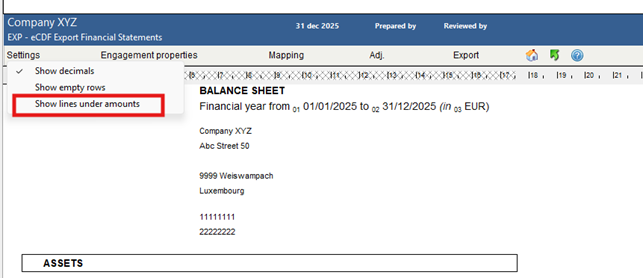
- New setting option “Show lines under amounts” to enable or disable underlining
- Cloudbridge update for uploading data to Lux FinTax engagement files in Caseware Cloud and improved support for external documents
6/10/2025 V4.4.2
- Firm settings
- New setting “Use narrow top margin on Financial Statements” is now enabled by default. This reduces the white space at the top of pages and improve overall presentation.
- Entity information
- Updated accounting thresholds for company sizes. The financial thresholds defining the categories of companies in the Accounting Law have been raised.
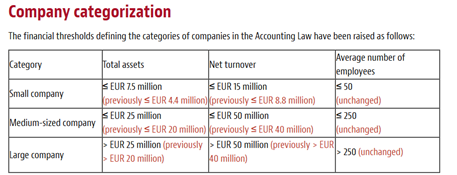
- Updated accounting thresholds for company sizes. The financial thresholds defining the categories of companies in the Accounting Law have been raised.
- Ecdf forms -- styling
- Size of the amounts are now consistent for groups and subgroups.
- Subtotals are no longer bold.
- All amounts are now underlined, in line with the official eCDF layout
- Bug fixes
- Fixed an issue where NETINC (Net income) could appear in the Chart of accounts when mapped manually, causing incorrect eCDF validation errors in the eCDF export form.
- Fixed a bug that could cause accounts to become unmapped.
- Fixed an issue where the title “Director’s report/Management report” appeared in the Table of Contents even when no external document was attached.
20/01/2025 V4.4.1
- Updated for Working Papers 2024 (installation of Working Papers 2024 is required)
- Added support for 2025 eCDF forms
- Management/Director's report: added a checkbox option to manually exclude this report if needed (also for a Medium/Large company size)
- Notes
- Accounting policies (Tangible and Intangible assets): added an expand/collapse option to prevent the table heading from appearing when there is no data in the rows
- Movements for the year: updated the opening balance label "As at xxx" to display the Year Begin Date instead of the Prior Year End Date
- Consolidated BS and P&L account: the update notification for this note will now be hidden if it is not applicable for a specific file.
- Freeform notes 5, 6 and 7: the checkbox option "Start new page after column x" from the Consolidation note can now be imported into Freeform notes 5, 6 and 7.
- Other
- Automapping: enhanced to ignore special characters in account numbers to ensure that the mapping continues to function correctly
- Rounding issues when handling large amounts have been resolved
- Improved the consistency in paragraphs and table width within the financial statements
02/05/2024 V4.3.2
- Bugfix regarding eCDF validation errors that may occur when exporting the XML file
19/04/2024 V4.3.1
- Bugfix regarding an eCDF validation error that may occur when exporting an XML file for engagements without prior year balances
12/02/2024 V4.3.0
- Updated for Working Papers 2023 (installation of Working Papers 2023 is required)
- Added support for 2024 eCDF forms
- Notes
- Consolidation/Multicompartment Securitisation note
- Added the option to start a new page after a specified column when printing the financial statements. One or more columns can be selected by the user in the note settings.
- Added support to print in landscape orientation
- Bugfix for newly created engagement files related to the year not being automatically specified when selected to include PY columns in matrix layout
- Gross profit or loss: Added the option to use date ranges on this note
- Accounting policies: Added the option to skip certain subtitles when printing the financial statements. This impacts the accounting policies on financial assets, provisions and creditors.
- Freeform 6 and Freeform 7 notes: Added validation checks on the tables
- Formation expenses, intangible assets, tangible assets, financial assets: Removed the option to delete default movement rows. The rows are still optionally hidden when they contain no amounts
- Other external expenses: Minor change in default wording
- Tangible assets: Bugfix where adding custom movement rows causes a duplicate row on net book value
- Consolidation/Multicompartment Securitisation note
- Other
- Excel Loader used for the Derivative financial instruments note
- The excel file is automatically carried over to the next engagement file when performing a Year End Close
- The excel file is automatically placed in the new folder "Supporting documents" on the document manager.
- Cloudbridge update for uploading data to Lux FinTax engagement files in CaseWare Cloud and improved support for external documents
- Unchecking that the company is currently in its first year of existence in Entity Information will automatically add prior year columns to the financial statements
- Bugfixing regarding the connection with Bob50 files.
- Excel Loader used for the Derivative financial instruments note
25/10/2022 V4.2.0
- Updated for Working Papers 2022 (installation of Working Papers 2022 is required)
- eCDF export
- Added support for 2023 eCDF forms
- Bugfix regarding captions in use that are hidden
- Bugfix regarding incorrect or missing validation errors
- Dashboard
- Cloudbridge
- Improved integration with CaseWare Lux FinTax
- Added functionality to upload external files (pdf, doc/docx, xls/xlsx, csv, png, jpg, txt)
- Added a Support tab with helpdesk and academy information
- Added link to release notes for newer versions
- Cloudbridge
- Note updates
- Derivative financial instruments
- Added Excel loading functionality to populate foreign exchange contracts through the use of an integrated Excel file
- Recorded variation columns are no longer printed when not used
- Bugfix regarding spacing
- Movements on the reserves and profit and loss items / Capital and reserves
- Added setting to include all capital and reserves items
- The table will expand and additional subtitles are added
- Other standard notes regarding capital or reserves in the document will collapse by default
- Note references in the balance sheet will adjust automatically
- Added setting to include a Total column to the table
- Added setting to include all capital and reserves items
- Financial assets
- Added N/A option through right click for new disclosed participations without published data available
- Added alphanumeric option through right click on disclosed participations
- Bugfix regarding incorrect validation error due to hidden PY data
- Intangible and Tangible assets
- Enabled note setting to show or hide net book value subtotals
- Bugfix regarding incorrect validation error due to hidden PY data
- Formation expenses: Added setting to include PY column
- General information: Modified English translation of legal form (SARL)
- Balance sheet and profit and loss account by entity/compartment: Default layout is now applied for new engagements
- Capital investment subsidies: Improved table layout
- Creditors: Bugfix related to incorrect signs displayed
- Gross profit or loss: Bugfix regarding a row not included when printing
- Derivative financial instruments
- Other
- Improved integration with Caseware Cloud
- Overall styling improvements on the financial statements
- Translation improvements
- Bugfix regarding validation errors in Entity Information
- Bugfix regarding Audit report incorrectly shown in the Table of Contents
19/04/2022 V4.1.2
- Subscribed capital note:
- Total nominal value per share has been removed from the share classes table
- Values in the share classes table are transferred and cleared accordingly when a year end close is performed
- Notes Other external expenses and Gross profit or loss: Added option to flip the sign or only use debit/credit values for each row
- Notes Financial assets, derivative financial instruments and freeform 4: Bugfix related to inconsistent date formatting for users with US regional date settings
- Bugfix related to eCDF headers when printed in PDF
- Improved Cloudbridge functionality to handle special characters in account descriptions
24/02/2022 V4.1.1
- Added validation check on the company size selection
- Updated legal form abbreviations
- Bugfix related to eCDF financial statement styling
- Creditors note: Zero values added to empty table cells
- Movements on the reserves and profit and loss items note
- Date of incorporation listed as opening balance date for new entities
- Table headings corrected according to the used financial year/period type
13/01/2022 V4.1.0
- Updated for Working Papers 2021 (installation of Working Papers 2021 is required)
- Integration of Cloudbridge to migrate information and financials to upcoming full Cloud Lux GAAP solutions
- eCDF export (EXP)
- Added support for 2022 eCDF forms
- Added validation check regarding invalid currencies
- PDF export location was changed to Financials folder
- Note updates
- Intangible-, Tangible-, and Financial assets: Added functionality to include prior year balances
- Share premium: Added dynamic table functionality to include custom rows
- Gross profit or loss: Added validation check
- Financial assets: Aligned wording with balance sheet captions
- Freeform notes 6 and 7: Added functionality to include prior year balances
- Consolidation note: Default lay-out set to one column
- Subscribed capital:
- Authorised capital no longer disclosed for Sarl
- Bugfix regarding date language
- Off balance sheet commitments: Bugfix related to hidden prior year information
- Freeform note 5: Bugfix related to landscape orientation
- Formation expenses: Bugfix related to incorrect balances
- Other
- Added firm setting to turn off internet calls
- Multiple note references now display chronologically in the Financial Statements
- Enabled default pagebreak after General Information note
- Netinc is now automatically assigned without using automapping
- Grouping numbers were removed from unassignable mappings
- Bugfix related to paragraph width in the Management report
- Bugfix related to incorrect negative balance sheet total
11/03/2021 V4.0.3
- Included additional mandatory fields in the eCDF XML export
- Management report is removed from the Table of Contents for small entities
- Minor styling enhancements to the eCDF forms
- Minor mapping modification to prevent signs to flip in the notes
- Bugfix regarding a lay out issue that could occur when printing financial statements in eCDF lay out with prior year hidden
- Bugfix in the tangible assets note regarding the gross book value of "Payments on account and tangible assets in the course of construction"
- Financial assets note
- Improved the presentation of multiple currencies for listed participations
- Bugfix regarding skipped rows for value adjustments
- Subscribed capital note
- Replaced total nominal value for share classes with average nominal value per share
- Nominal value per share for share classes is never rounded
- Opening balance shows as at the year begin date
- Share premium note
- Bugfix related to the page break
- Opening balance shows as at the year begin date
15/02/2021 V4.0.2
- Dashboard optimized for use with the latest Working Papers 2020 version
- Fixed incorrect presentation of the abridged profit and loss account for 2019 engagements
- Fixed rare issue that would generate an invalid XML file for 2020 engagements
- Note "Off balance sheet commitments" by default discloses that there are none to be reported
- Other minor fixes and improvements
- Table related to participations in other undertakings in note "Financial assets" is optimized to span multiple pages
- Default references in the profit and loss accounts now include notes "Gross profit or loss" and "Other external expenses"
- Default sorting order optimized for the notes
- Use of the internal management report shown on the Table of Contents
- Wording logic fixed in the management report default library
- Fixed settings for French and German versions of the note "Subsequent events"
19/01/2021 V4.0.1
- Fix regarding an issue that may occur when exporting XML files in 2021 to be deposited at the eCDF portal, for engagements with a year begin date in 2019 or older
04/01/2021 V4.0.0
Important: V4 of the CaseWare Lux GAAP template can no longer be used to create engagement files with a year begin date in 2019 or older. All new engagement files will have PCN2020 included. Pre-existing engagement files will be prompted to convert the mapping when the year begin date is set to 2020 or later. We will make a blank PCN2009 engagement file available for download that can be used to create a PCN2009 engagement file while having this latest version installed.
- Updated for Working Papers 2020 (installation of Working Papers 2020 is required)
- Integration with our AnalyticsAI application
- Mapping conversion to PCN2020
- All documents and all financial notes have been updated to work with the new official eCDF 2020 mapping tables
- The eCDF XML export is now updated and approved for XML 2.0 filing
- New integrated 2020 eCDF validations
- New widget added to the dashboard to consult training courses from our online CaseWare Academy.
- Entity Information (PERM)
- New option to choose Commissaire aux Comptes as auditor
- Added legal form “Société en Commandite Spéciale” (SCSP)
- Address fields more clearly displayed
- Legal form displayed in French
- Guidance regarding date ranges was added
- Financial Statements (FSL)
- Option to display Audit report in French in the Table of content
- Repeated note titles on subsequent pages are now supported when using freeform notes to extend another note
- eCDF layout printing now supported with prior year hidden
- Improved rounding functionality
- New standard notes
- Gross profit or loss
- Other external expenses
- Emoluments granted to the members of the management and supervisory bodies and commitments in respect of retirement pensions for former members of those bodies
- Advances and loans granted to the members of the management and supervisory bodies
- Off balance sheet commitments
- Note updates
- Subscribed capital: The use of different share classes is now supported in a new table lay-out
- Financial assets: Table with undertakings now supports multiple currencies
- Intangible-, tangible- and financial assets: Tables under the fair value model are redesigned in the back-end to correctly display balances when fair value adjustments are recorded in the profit and loss account
- Accounting policy for (in)tangible assets: rows are no longer printed if empty
- Accounting policy for Debts renamed to Creditors
- Share premium: Table is separately collapsible and dates added in the table
- Movements on the reserves and profit and loss items
- Empty rows are no longer printed
- Bug fixed where deleted rows cause an incorrect validation
- Staff: Table is separately collapsible
- Net turnover: Collapses when a detailed profit and loss account is used
- Other operating expenses: bugfix additional content paragraph
- Minor wording, styling and spacing changes/corrections in multiple notes
- eCDF Export (EXP)
- Added the operating name in the document header
17/08/2020 CaseWare Academy
- Release of our online CaseWare Academy
- CaseWare Lux GAAP - General training. This online training will teach you all the basic functionalities to start using the CaseWare Lux GAAP solution. Certification is granted upon completion.
- Send us an e-mail at info@caseware.be to enroll in the CaseWare Lux GAAP training bundle. All future courses will automatically become available in your account.