
Caseware Cloud
Lux Audit
Update 11/06/2026
Firm template update required for new engagements.
-
Independence Declaration Pop-up
-
When a user opens an (unlocked) engagement for the first time, they must confirm their independence via a pop-up before accessing the engagement.
-
All confirmations are automatically recorded in the 0 Independence Confirmation document in the Engagement set-up folder and will also be available in the Lux Audit Monitor> Declaration of independence column for centralized follow-up across engagements.
Important for Cloud Admins: If your firm does not wish to use the automatic pop-up, it can be disabled in the firm template within the Independence Confirmation document. The change takes effect immediately and does not require republishing the firm template.
-
Admins can also define custom pop-up text in multiple cloud languages by enabling "Use custom text for the independence confirmation", entering the desired text, and clicking "Apply Changes".
Please note: the custom text can only be applied to engagements where independence has not yet been confirmed, or to new engagements created afterwards.
-
-
Support short and long financial years
-
The engagement start date can now also be modified in Engagement Properties and is correctly reflected throughout the engagement.
-
-
Overridden Risk Levels Are Now Visible in Risk Assessments
-
The default/calculated risk level is indicated with a dotted border, making overridden risk levels easier to identify.
-
-
Completeness of the engagement file
-
External documents available on the Documents page, such as Excel, Word or PDF files, can now be selected and linked via the selector in the Link column.
-
Monitor(+) Update 4/06/2026
We recommend clearing your cache and refreshing the page before testing these new features.
Centrally planned files
“Centrally Planned” column in the Audit Monitor. This column indicates whether an engagement has been centrally planned, as well as the relationships between the source file  and the destination file
  .
.
Performance improvement
Performance improvement when adding multiple Monitor+ columns.
-

- This will significantly reduce the loading time of the indexing process.
Sign-off workflow improvements
It is now possible to display customised sign-off roles in Monitor(+) columns. These customised roles can be added at both file level and template level in Lux Audit files.
In addition, two new icons have been adopted from the Cloud file. These icons indicate when not all prepare  and review
  roles have been signed off.
Compact Excel export
The addition of this feature makes it possible to display the sign-offs from Monitor(+) columns in a simplified manner.
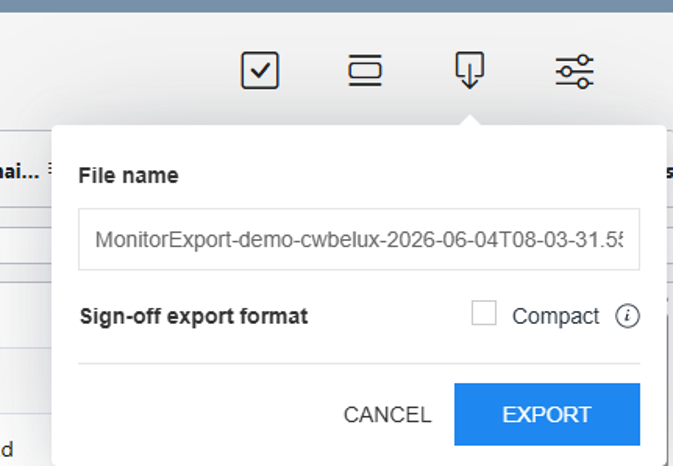
By ticking the “Compact” box, only the highest sign-off level will be displayed in Excel. In addition, as of today, it is possible to customise the name of the Excel file.
If you do not wish to use the compact export, you can still use the original export by simply clicking on “Export” and unchecking the box. This will display all sign-off statuses in the Excel cell, as well as the initials of the person signing off (only for standard Monitor columns) and the date on which the document was signed off.
Update 19/03/2026
-
The eCDF 2026 forms are now available for new engagements. They can also be added to existing engagements via the Documents page using the + button at the folder level.
Update 21/08/2025
- Funds
- Added checklist 2100. Unrealized gains/losses
- New Risk assessment area for the same caption
- Other improvements and fixes
- A500 Materiality: Trivial misstatement percentages now display in the correct order
- Reference links to B450 Risk report and B500 Risk assessment report reinstated
- Duplicate in D400 Internal annual accounts corrected
Monitor Update 10/07/2025
- Monitor Functionality Improvement
- When changes are made to the Engagement Properties (such as the Audit Report Signing Date or the Lockdown date), these are now immediately updated in the Monitor.
Update 03/07/2025
- Group audit
- The group audit feature streamlines collaboration by allowing group auditors to identify, share, and assign common work areas—such as risks, controls, and checklists—across components within the same engagement. This reduces manual data entry and ensures consistency by consolidating and tracking work centrally through Caseware Cloud.
- Central planning
- Central planning allows you to sync risks, controls and selected checklists across engagements so the work doesn’t need to be duplicated in multiple engagements.
- Name and categorize inherent risk factors
- You can select (from 7) inherent risk factors from the Risk card and/or the Risk dialog box.
- Risk Assessment per Risk
- It is now possible to perform a risk assessment on an individual risk, using the same level of assessment that you would apply to the assessment of risk for the entire engagement.
- Copy risks and controls across engagements
- You can now copy risks and controls from an engagement, or a component within a group audit, into other engagements within your Caseware application. The icon 'Copy from external engagement item' at the top-right corner of your engagement menu will allow you to copy data from another engagement into the current engagement. This feature supports consistency and reduces manual effort when preparing a group audit or an engagement.
- Import adjustments from Excel
- The Import Adjustments tool now supports Excel instead of CSV files, making data import more flexible.
- Completeness of the engagement
- A new 'N/A' status has been added for hidden or linked documents that are not applicable to an engagement.
- Bug fixes
- Resolved a visibility issue with the Materiality check procedure in the A100 Optimiser checklist
- Other minor fixes
Update 08/05/2025
This update does not include a new version of the template. All changes apply to both new and existing files.- Version control in 'financial documents': Toggle visualization of versions to be compared
- You can now switch between versions of content using back and forth navigation buttons. An additional button, Show difference, will compare the two versions.
- Custom calculation - Modify decimal placement
- You can now modify decimal placements when using the custom calculation feature (in text sections,...)
- Revert changes to default template for text sections or dynamic tables in financial documents or worksheets
- You can now revert the content of dynamic tables or text sections to their original state as they were when the engagement file was created. This new option is available in the More actions [
 ] menu, making it easier to restore the initial content if needed.
 - Note: Content will revert to its original source template, not the latest version available.
- You can now revert the content of dynamic tables or text sections to their original state as they were when the engagement file was created. This new option is available in the More actions [
Update 10/02/2025
This update does not include a new version of the template. All changes apply to both new and existing files.
- Version control in Financial statement and other document types
- You will now see the "Version Control" button in the Document Map of financial statement, letter, worksheet and memo type documents.
Version Control is being provided in the platform to assist you complete reviews more efficiently. You can selectively save versions of a document, which can then be compared to highlight content changes that were made between versions.
- You will now see the "Version Control" button in the Document Map of financial statement, letter, worksheet and memo type documents.
- Assign accounts improvements
- Enhancements to the Assign Accounts tab, including improved drag-and-drop functionality when assigning accounts to groups have been added.
- You can leverage AI to suggest column assignment automatically when importing your trial balances using Excel or CSV files, so you do not have to manually assign the columns.
- Select a file to import from the engagement
- You can now import data from CSV and Excel files that are on the Documents tab. The Import from Documents option is available from the Datasets tab.
- Analytic-test improvements
- Firm authors can duplicate analytic tests, adjust parameters, filters, and metadata, and configure key fields such as names, descriptions, and default values—all within the Analytics Hub.
- Fixes
- Various bug fixes and improvements have been implemented.
Monitor Update 23/01/2025
- Bug fix
The total number of open issues per file has been fixed.
Update 16/01/2025
- Updated D350 Partner and manager summary
- Engagement team members in the Planning phase of this document are now accurately retrieved from the updated Engagement team resources table in document A300 (Overall audit strategy).
- Visibility in checklists A200, A300 and B300
- The visibility conditions for Narrative/Procedure responses have been corrected. Previously, these conditions often referred to the Narrative/Procedure question of the first subgroup in the checklist. In ongoing files, we recommend manually adjusting the visibility conditions in these checklists.
Update 09/01/2025
- Changes related to ISA 600
To ensure compliance with the new ISA 600 changes, we've implemented the following:- Changes to the workflow when assessing group audit considerations: the decision around group audit has been moved to the A200 - Preliminary engagement activities document to ensure that the auditor performs this evaluation at the beginning of the audit work. Additional considerations for group audit will still be documented in A300 - Overall audit strategy.
- Certain documents have been removed from the Lux Audit product (see below for the full list of documents). These have been replaced with new documents/procedures in existing documents.
- New documents
To assist auditors with the new ISA 600 standard (and also in other areas), we've added the following documents:- A360 - Worksheet - Selecting a component auditor
- A510 - Group audit - Component materiality
- B335 - Understanding the financial reporting process
- B510 - Group audit program - Engagement scoping components
- C160 - Financial reporting - Audit procedures
- C165 - Worksheet - Evaluating the work of a component auditor
- C205 - Letter to a component auditor
- C210 - Instructions for a component auditor
-
List of updated documents
|
Document Number |
Document Name |
Changes |
|---|---|---|
|
A200 |
Preliminary engagement activities |
Document guidance. Major procedure changes. New procedures. |
|
A205L |
Terms of engagement - Engagement letter - Draft |
Major changes. |
|
A305 |
Worksheet - Selecting an auditor’s expert |
Minor procedures changes. |
|
A310L |
Hiring an external audit expert |
Removed. |
|
A300 |
Overall audit strategy |
Document guidance. Major procedure changes. New procedures. |
|
A340L |
Audit planning letter (Those charged with governance) |
Major changes. |
|
A360 |
Worksheet - Selecting a component auditor |
New document. |
|
A400 |
Team planning discussions |
New procedures. |
|
A405 |
Preparing the risk assessment procedures |
Major procedure changes. New procedures. |
|
A500 |
Materiality |
Major changes. |
|
A505 |
Materiality of qualitative disclosures |
Removed - incorporated into A500. |
|
A510 |
Group audit - Component materiality |
New document. |
|
B010 |
Influencers |
Removed. |
|
B040 |
Analytics Insight |
Removed. |
|
B200 |
Understanding the entity and its environment |
Document guidance updated. Minor procedure changes. |
|
B200Q |
Understanding the entity and its environment - Query |
Document guidance. |
|
B300 |
Underst. of the comp. of the entity's system of internal control |
Minor procedures changes. |
|
B305 |
Understanding the IT environment |
Document guidance. Major procedure changes. New procedures. |
|
B310 |
Understanding the IT environment - Listing |
Document guidance. Major procedure changes. |
|
B315 |
Identifying risks through understanding |
Minor guidance changes. |
|
B320 |
General IT Controls |
Document guidance. Major procedure changes. New procedures. |
|
B335 |
Understanding the financial reporting process |
New document. |
|
B510 |
Group audit program - Engagement scoping components |
New document. |
|
C135 |
Subsequent events |
Major procedure changes. New procedures. |
|
C145 |
Use of journal entries |
Major procedure changes. |
|
C160 |
Financial reporting - Audit procedures |
New document. |
|
C155 |
Worksheet - Evaluating the work of a component auditor |
New document. |
|
C205 |
Group audit - Acceptance and planning |
Removed. |
|
C210 |
Group Audit - Evaluation and conclusion |
Removed. |
|
C215 |
Group Audit - Evaluation and conclusion |
Removed. |
|
C220 |
Worksheet - EQR checklist - Group audits invo. comp. auditors |
Removed. |
|
C225 |
Worksheet - Group audit - Group audit planning memorandum |
Removed. |
|
C230 |
Worksheet - Group audit - Group component summary |
Removed. |
|
C235 |
Worksheet - Group audit - Component auditors summary |
Removed. |
|
C245 |
Worksheet - Consolidation - Instructions for consolidation procedures and group financial reporting |
Removed. |
|
C250 |
Worksheet - Consolidation procedures |
Removed. |
|
C255 |
Worksheet - Goodwill impairment |
Removed. |
|
C305 |
Worksheet - Group audit instructions |
Removed. |
|
C310 |
Worksheet - Group audit questionnaire |
Removed. |
|
C315 |
Worksheet - Group audit questionnaire - Subsequent events |
Removed. |
|
C320 |
Worksheet - Component auditors - Firm summary profile |
Removed. |
|
C325 |
Worksheet - Component auditors - Firm infrastructure evaluation |
Removed. |
|
C330 |
Worksheet - Component auditors - Firm methodology evaluation |
Removed. |
|
C335 |
Worksheet - Component auditors - Firm independence confirmation |
Removed. |
|
C205 |
Letter to a component auditor |
New document. |
|
C210 |
Instructions for a component auditor |
New document. |
|
D505 |
Worksheet - Matters to be communicated to management and TCWG |
Document guidance updated. Major procedure change. New procedures. |
|
D510 |
Communications to be made by the auditor with TCWG and management |
Document guidance updated. Major procedure change. New procedures. |
|
D515L |
Management letter - Draft |
Minor changes. |
|
D520L |
Report for those charged with governance |
Document guidance. |
|
D525L |
Audit findings - Sample letter |
Document guidance. Minor changes. |
|
D610 |
Reporting checklist |
Major procedure changes. |
|
D615 |
Documentation checklist |
Major procedure changes. |
|
D625 |
Checklist - Audit completion (Core) |
Document guidance Major procedure changes. Conclusion updated. |
- A100 Optimiser checklist
- Minor improvements to the presentation of the checklist questions.
- Audit lite forms (A1, B1, C1 and D1)
- Reference documents to the full audit version have been moved to the procedure Guidance section (lightbulb icon).
- A500 Materiality
- The trivial misstatement percentage range has been extended from 5% to 10%.
- Other minor improvements and bug fixes
Monitor Update 19/12/2024
- Bug fix
Blank page when opening Lux Audit Monitor is fixed.
Update 03/12/2024
This update does not include a new version of the template. All changes apply to both new and existing files.
- Embedding the Datasets page within the Data page
To unify the data import and viewing experience, the Datasets page is now embedded in the Data page. The Import tab has been replaced by the new Datasets tab on the Data page. When you select to import data on the Datasets tab, the entire import process happens within that tab, instead of opening a new browser tab.
- Saved views for the Data page
The Save views icon is now available on the Data page that allows you to save your current view and access previously saved views.
- View a dataset from the Datasets tab
You can now view a dataset from the Datasets tab of the Data page. While previously, you could only view trial balance and general ledger in the Data page, you can now select the View data button for any dataset to view it.
- Import from existing engagement
The new imports workflow also includes the option to import trial balance data from an existing engagement. When you select the Import from Caseware Cloud Engagement option, a dialog opens that allows you to select the engagement from which you want to import.
- Custom formulas for the Overall Materiality Table
You can now use custom formulas in the Overall Materiality Table.
- Materiality and performance materiality for specific circumstances for areas
- Issues for dynamic table rows
You can now add issues to dynamic table rows. The Issues icon displays when you hover your cursor over the right side of a dynamic table row. You can then select the icon to add an issue.
- Filter adjustments
An All types dropdown is now available on the Adjustments page that allows you to filter adjustments by type. When you select to export adjustments, only the filtered adjustments are included in the generated file. This allows you to select only the types of adjustments you need and provide a copy of them to your clients.
- Copy account assignment for consolidation engagements
An update has been made to the Copy account assignment option on the Assign accounts page. When you select a consolidation engagement to copy account assignment from, you can then select which engagement in the consolidation hierarchy you want to use as the source engagement. You can also select multiple grouping structures to copy from the source to the destination engagement.
- Improved guidance on date fields for Excel imports
Additional guidance is now available on the Assign Fields page when you are assigning date fields for data imported from Excel.
- Bug fixes
Update 22/10/2024
This update does not include a new version of the template. All changes apply to both new and existing files.
- Search for financial groups on the Data page
To allow you to more easily find financial groups, a search option is now available on the Financial groups tabs on the Data page.
- Calculated adjustments
You now have the ability to create calculated adjustments. When you add an account or group line to an adjustment, you now have the option to select fx in the Amount field and create a calculation to determine the adjustment amount. If the value of the referenced trial balance account or group is changed, a Recalculate button appears to recalculate and update the adjustment amount.
Monitor Update 05/09/2024
- A new column for Entity Tags has been added.
- A new column, 'Version,' has been added to indicate whether the full audit or the lite version is applied to the engagement.
- The column related to the lockdown date has been split. A new column 'Lockdown due' has been added to separately indicate the lockdown deadline based on the date of the Audit report.
- If the number of days until lockdown becomes negative due to a delayed lockdown, this number will remain even after the file has been locked.
- A button 'X' has been added to remove a filter from a column.
- Bugfixes
Update 29/08/2024
- Updated import page and automatic assignment of Trial Balance accounts.
- When configuring the columns during the import of the Excel/CSV file, the "Financial Group Number" can now also be selected. This allows the accounts to be assigned to the financial groups directly via the Excel file.
- After configuration, a data layout can be saved. This layout can be selected when configuring the columns at the top right of the page. This way, the configuration does not need to be done repeatedly.
- Accounts are no longer automatically assigned by default. A new option has been added to the Optimiser checklist that allows automatic assignment to be applied if needed.
- An option has also been added to the Optimiser checklist to collectively unassign the assigned accounts.
- New company types are now available: UCITS, RAIF and Other AIF
- Document A100 Optimiser checklist: an additional option to tailor engagements for UCITS, RAIF and Other AIF is included.
- Data page and leadsheets: selecting any of these fund types as the nature of the company in the Optimiser checklist will display the corresponding mapping in the Data page and leadsheets.
- A500 Materiality document: a new default benchmark "Net asset value" to calculate materiality levels are in place, based on the new mapping.
- New financial statement areas for these fund types have been added for Risk assessment purposes.
- Plans and procedures phase: only the relevant checklists for these fund types will be included in your engagement file (if "UCITS/RAIF/Other AIF" is selected in the Optimizer checklist).
- 2 new freeform checklists have been added. You can edit and add specific procedures in these checklists manually:
1900 Net asset value
2000 Realized gains/losses
- 2 new freeform checklists have been added. You can edit and add specific procedures in these checklists manually:
- In the Optimiser checklist, a distinction has been made between "First Year - taking over from a predecessor auditor" and "First Year - not audited before by a predecessor auditor" and the related content logic has been adjusted accordingly.
- In the Engagement Set-up folder, you can now import adjustments via a CSV file.
- The Split Adjustments option is now available on the Data page. When you turn this option on, normal and reclassifying adjustments are displayed in separate columns.
- In the Materiality document, a percentage can be selected for the calculation of the Trivial Amount.
- Analytics
- The following documents have been removed from the Analytics folder:
● B010 - Influencers
● B040 - Analytics Insight
These documents have been replaced with a new technology stack that is embedded in our documentation.
You will now have access to the analytics tests directly in the C145 - Use of journal entries document.
- The following documents have been removed from the Analytics folder:
- Other minor improvements and bugfixes , e.g. visibility of certain procedures in the Plans and procedures checklists
Update 20/06/2024
- Data page
- Financial groups: when you access the financial groups tabs of the Data page, you can now reorder groups, and expand and collapse groups.
- Select how many rows to display: you can now select how many rows to display on the Data page from the Rows per page dropdown.
- Edit planning balances: you can now edit planning balances on the Data page even after the final balance has been imported.
- Bulk actions for documents
When you turn on the Bulk actions option from the More actions (... ) menu on the Documents page, you can select multiple documents and then move, delete or sign off on all of those documents at once. - Review Tools enhancement
When you select the number next to a review tool in the Review Tools popover, the document now automatically jumps to the next item flagged for that review tool. This improvement makes it easier to navigate through items that need review in a document. - Carry forward for adjustments
You can now edit and delete prior year adjustments in engagements created from carry forward. - Link annotations to checklist procedures
You can now link annotations to specific checklist procedures instead of the checklist document as a whole. - Risk Library design updates
A number of changes have been made to the design of the Risk Library page to improve usability.
Update 15/02/2024
- Modify financial group names
You can now modify the names of financial groups from the Data page. Note that when you modify a group name, the name you enter will be used for the group regardless of sign changes and will override the consistent, contrary and inconsistent names of the group. You also have the option to revert your changes from the Group properties dialog.
Update 12/10/2023
- Content update: include changes and new requirements regarding ISA 220 (Revised): Quality Management & ISQM 2: EQR
- New D350 Partner and manager summary document added to the Completion phase
- New (optional) worksheets added (Engagement risk factors, Inherent risk factors, Understanding climate related issues & revenue streams, Going Concern considerations) to the Planning & Risk assessment phases.
- Workflow and usability improvements (some documents merged & unnecessary letters removed)
- Some other procedure changes in existing checklists
- The following PCN groups have been reallocated:
- Group 16: PPE --> Equity
- Groups 45.1.2.2; 45.2.2.2 and 47.2: Non-current borrowings --> Other non-current liabilities
- Group 47.1: Current borrowings --> Other current liabilities
- Group 48B: Prepayments --> Other current liabilities
- Group 61: Payroll and other expenses --> Cost of sales
- The following Plans & procedures folder/checklists have been renamed:
- “Cost of sales” --> “Cost of sales and other external charges”
- “Bank indebtedness” --> “Other current liabilities”
Update 20/07/2023
- Additional tailoring questions in the A100 Optimiser checklist
- General content update
- Accounting estimate - Risk assessment procedures and risk response documents have been added to all Financial Statement Areas in the Plans and Procedures folder.
- B265 Outcome of prior period accounting estimates worksheet has been added to the Accounting Estimates folder.
- Changes regarding Accounting estimates procedures have been implemented to all Financial Statement Area work programs in the Plans and Procedures folder, with document reference X.101
- Other procedure and Document guidance changes in various checklists
- New Audit Lite forms (for small audits)
- New eCDF Financial Statement form in the General folder
- Risk Library available in the Risk assessment tab
- Enhancements to engagement lockdown
- A new Lockdown settings section has been added to the product settings and are available for firm template authors/admins.
- As a user, you can specify the report signing date in the Engagement Properties popover.
- Copy import data across engagement files
- Engagement completeness form added in the Completion phase
- & linked with the Lux Audit Monitor
- Reduced number of fields in the Controls report
- Other minor changes and bugfixes
- Visibility on documents and folders
- Reference links in some checklists
Update 06/07/2023
-
Documents page navigation
When you navigate back to the Documents page after viewing a document, you are now automatically returned to the same location. This improvement ensures you don’t have to spend time navigating back to your previous location.
-
File restoration
You can now restore and download deleted third-party files from the new Recycle Bin. Examples of third-party files include Word, Excel and PDF documents.
When you delete a third-party file, the Recycle Bin option appears in the left pane of the Documents page.
When you navigate to the Recycle Bin page, you can view a list of deleted documents and select to download them or view the file history from the ) menu.
From the File History page, you can view all previous versions of the document and select a version to restore.
-
Duplicate adjustments
You can now use the Duplicate option to duplicatie adjustments. This option creates a new adjustment with the same type, description and account details as the original adjustment.
Note that any annotations, issues, or signoffs associated with the adjustment are not copied, and the duplicate adjustment defaults to the current year even if the original adjustment is for the prior year.
-
Copy visibility settings
As a firm author, you can now copy visibility settings for dynamic tables and text sections in your firm template that have been authored by Caseware in financial statements.
-
Carry forward for controls
Controls are now included when engagements are carried forward.
-
Issues for contacts
A new issue type, Client Comments, has been added. Client contacts with read-only permissions can create, view and respond to issues of this type. This allows contacts to add and respond to issues where their input is required, while maintaining the ability for staff users to discuss other issues privately.
Update 07/02/2023
- New controls report
The Controls tab is available in the risk module and the module name is changed to Risks & controls.
- Enhancements to consolidation
A number of enhancements have been made to engagement consolidation to support more complicated consolidation hierarchies and circumstances where subsidiary entities do not require separate engagements.
You can now use the Add imported TB option to create internal subsidiary entities for your parent entity and upload trial balance data without linking a separate engagement file for the subsidiary.
- Create new Word and Excel documents
You can now create new Word and Excel documents from within an engagement on the Documents page.
Update 06/10/2022
-
General content update
- Changes to all Financial Area work programs in the Plans and Procedures
- Response set changes in Financial Area work programs and other Checklists
- Substantive analytical procedures worksheets added to all Financial Areas in the Plans and Procedures folder
- Tests of controls sampling worksheets were added in the Tests of Control folder under the Risk Response folder
- Group audit related documents have been modified to remove older group audit content
- New documents have been added and some documents have been removed
-
Planning balances are enabled
- You can now upload planning balances for the current and prior years and;
- View the planning balances in the Data page including multiple options for variance columns to view any changes between the planning and final balances.
-
Risk assessment
- An Inherent Risk section has been added for each Financial Statement Area (FSA) and can be determined on the basis of the Likelihood of a Misstatement Occurring (LMO) and the Magnitude of a Potential Misstatement (MPO)- as part of the revised ISA 315 standard.
-
Signoffs
- Documents A500, A505, B500 and B700 have been assigned a new role scheme and can now be signed off separately during preliminary and final audit.
- Documents C205, C215 and D625 have been assigned the Partner review signoff scheme by default.
-
(Re)Insurance companies
- The B101 Analytical Review document is now also available for (Re)Insurance companies.
Update 17/02/2022
- Create areas
- You now have the ability to create audit areas and assign them to financial groups. You can also change the default audit area assigned to existing financial groups.
- The option to create areas is available in both the Template and engagement file from the NEW AREA option in the Risks tab or in the Product settings>Features>Areas.
- As part of this enhancement, you can also now assign areas to financial groups in the Data page.
- The same applies for checklists: you can assign checklists to multiple areas in the Checklist Settings. Select one or more financial groupings or areas to associate with the checklist. Risks that apply to the selected financial groupings or area will be displayed in the Risks tab of the checklist.
- Import zero balance accounts
- You can now select to include zero balance accounts when importing data from CSV or Excel files.
- Enhancements to signoffs for risks
-
Similarly to the risk report, you can sign off the entire report or individually sign off each risk in the risk assessment report.
-
You can now apply custom signoff schemes to the risk and risk assessment reports.
-
- Controls testing option for risks
- In the Will you be testing controls? option you can select whether you are testing controls for each area in the risk assessment report. If you answer that you are not testing controls, the Control risk for each assertion will be automatically set to the highest level risk. Note that this will not overwrite any manual selections made previously.
- Disable assertions for areas
- You can now use the checkbox for assertions to disable assertions for each area. This allows you to only enable assertions that are relevant for the area.
- Make hidden procedures and documents visible when linking
- When you link a risk to a hidden procedure or document, a dialog now displays to inform you that if you choose to continue, the hidden procedure or document will now become visible.
- Copy and paste documents across engagements
- The Copy from CaseWare Cloud option now allows you to copy documents from other engagements within the same entity. You can select which engagement you want to copy documents from and then select the specific document.
- Other minor improvements and fixes
- Signoff for Mapping Configuration tool is disabled
- (Re)Insurance company: tables in document B035 Data Completeness Check - AnalyticsAI are now enabled
- Data page- informational: the Net Income balance is now automatically allocated to financial group 14.2 Result for the financial year
Update 06/01/2022
- A new company type is now available: Re/Insurance companies
- Document A100 Optimiser checklist: an additional option to tailor engagements for Re/Insurance companies is included.
- Data page and leadsheets: selecting "Re/Insurance" as the nature of the company in the Optimiser checklist will display the corresponding mapping in the Data page and leadsheets.
- A500 Materiality document: new default benchmarks to calculate materiality levels are in place, based on the new mapping.
- Plans and procedures phase: specific procedures and related assertions for Re/Insurance companies will be displayed in a separate Subgroup in the checklists of the following Financial Statement Areas (if "Re/Insurance" is selected in the Optimizer checklist):
- 130.101 Accounts receivable, trade and other
- 135.101 Prepaid expenses and other assets
- 425.101 Accounts payable and accrued liabilities
- 1500.101 Revenues
- 1600.101 Cost of sales
- New Mapping Configuration Tool
- This new feature is added in the Engagement set-up folder and improves efficiency by allowing you to pre-define (non-standard) mapping layout files. An online tutorial on how to use this tool will be added to the Lux Audit training bundle.
- Other minor improvements and fixes
- Visibility settings
- Missing sign-off buttons for procedures in documents A100 and A405 are enabled
Update 21/10/2021
- Content update:
The following list summarizes the content updates implemented:
|
Document Number Lux Audit |
Document name |
|
A200 |
Added 1 new procedure. |
|
A300 |
Added 1 new procedure. |
|
B100 |
Minor change to document guidance. |
|
B200 |
3 new sub procedures included for Agricultural assets, Leases for lessees, and Government grants. |
|
B600 |
Minor changes to 3 procedures. |
|
B600 |
Minor change to document guidance. Added 1 new procedure. |
|
B305 |
Minor change to document guidance. |
|
B310 |
Minor change to document guidance. |
|
B250 |
Deleted 5 procedures. |
|
B320 |
Minor change to document guidance. |
|
C115
|
Minor change to document guidance. |
|
C155 (New form) |
New form. The document will show when the user selects Yes for The engagement requires documentation on the nature of the consultation procedure in document A200. |
|
C170 (New form) |
New form, included in a new Group Audit Concise Content folder in the Risk Response section. The document will show when the user selects Yes for the Group audit alternative approach procedure in document A300. |
|
C180 (New form) |
New form, included in a new Group Audit Concise Content folder in the Risk Response section. The document will show when the user selects Yes for the Group audit alternative approach procedure in document A300. |
|
C190 (New form) |
New form, included in a new Group Audit Concise Content folder in the Risk Response section. The document will show when the user selects Yes for the Group audit alternative approach procedure in document A300. |
|
110.125 130.125 1600.125 1650.125 1600.103 1600.107 |
Minor change in Sample size text. |
|
40.101 (New form) |
New form. |
|
335.101 (New form) |
New form. |
|
340.101 (New form) |
New form. |
|
D300 |
Minor change to document guidance. |
|
D610 |
Moderate changes to 21 procedures. |
|
D545L |
Minor changes to content. |
- New audit Work Programs:
New Audit Work Programs have been introduced. The documents related to this change are disclosed below:- 40.101 Agricultural Assets - Audit Procedures (New document)
- 335.101 Government Grants - Audit Procedures (New document)
- 340.101 Leases for Lessees - Audit Procedures (New document)
- New Queries and Query Templates have been created:
- 40.101Q Agricultural Assets - Query (New document)
- 40.101QT Agricultural Assets Query Template (New document)
- 335.101Q Government Grants - Query (New document)
- 335.101QT Government Grants Query Template (New document)
- 340.101Q Leases for Lessees - Query (New document)
- 340.101QT Leases for Lessees Query Template (New document)
- Master sample size worksheet:
In this new version of Lux Audit a Master Substantive Sampling Test of Details Worksheet has been included, to assist in the calculation of the sample sizes for substantive sampling. Refer to the guidance on how to add a new instance of the Substantive Sampling Test of Details Worksheet. - New Financial Statement Areas:
- Agricultural Assets
- Government Grants
- Leases for Lessees
- New feature:
- In the Data page, you can manually add trial balance groups to a grouping structure in the firm template, if needed.
You can also edit or delete any groups you create. Note that you cannot edit or delete any pre-existing groups in the template.
- In the Data page, you can manually add trial balance groups to a grouping structure in the firm template, if needed.
- Other minor updates and fixes:
- A100 Optimiser Checklist: question 'Only use the query system?" removed.
- A500 Materiality: replaced 3 manual input materiality benchmarks by auto-calculated ones.
- A110 and D400: minor content changes and layout improvements.
- B100 Analytical Review: corrections and further breakdown of some accounts.
Update 29/04/2021
- New Documents page layout
- The Second Reviewer button is no longer available in the Engagement properties window.
- The More actions (...) | Sign-off option is no longer available.
- Roles and signoff schemes
- Roles, where you define the preparer role labels and the reviewer role labels. You can add as many roles as needed. To learn more, see Define signoff roles.
- Schemes, where you set up the applicable combination of preparer roles and reviewer roles for a specific document or a group of documents. To learn more, see Set up signoff schemes.
- Risks
- As a firm author, you can now choose whether or not to include a text field in risks analysis widgets to add comments or notes. A new check box Include the comments field in risk analysis widgets is now available in the Risks | General tab in the product settings (included in this version). Previously, this text field was always available in analysis widgets.
- Enhanced review tools in checklists
- You can now use review tools to track changes made in checklists after the reviewers have signed off if the Modified since last review option is turned on in the Documents page.
- Empty Input columns in dynamic tables
- Empty Input columns (when cells are blank or zero) in dynamic tables are now automatically excluded when you print the financial statements. When you view the financial statements in an engagement file, the headers of empty Input columns display in gray.
- Queries
- Improved query UI: the new query layout now features buttons available at the bottom of each question.
- You can now edit and delete your comments in the new query layout.
- The comments area in queries now also displays the history of each question.
- Risks module
- A new filter Signoffs is now available in the new risk module.
- Customize format settings
- You can now change the default product settings for the following format settings in an engagement: Currency, Date format, Numbers and Measurement unit.
- Drag and drop documents in the new Documents page
- You can now drag and drop external documents, such as PDFs, Word files and Excel files from your desktop into folders and placeholders in the new Documents page.
- Transactions
- The Columns and Filters drop-downs in the Transactions tab in the Data page have witnessed a few additions and updates.
- Replace external documents
- You can now replace external documents. You can either select More actions (
 ) | Replace or drag and drop a new document onto the old document to replace it. When you replace a document, you can choose whether to remove pre-existing signoffs or retain them.
- You can now replace external documents. You can either select More actions (
Update 08/01/2021
- Content update
|
Document Number Cloud |
Changes |
|
B250 (New Form) |
Updated the name of the Form. Reworded instructions for clarity and defined a complex accounting estimate. Added additional procedure to allow for documentation of the nature of the estimation. Added explicit procedure for documenting estimation uncertainty. Reworded procedures for clarity and removed duplicated procedure. |
|
B255 (New Form) |
Updated the name of the Form. Clarifications within the instructions and define a complex accounting estimate. Addition of data integrity procedures for compliance with ISA540 A39. Reworded procedures for clarity and remove duplicate procedure. |
|
C130 |
Major change to 7 procedures. Added 7 new procedures Delete 6 procedures. |
|
B600 |
Added additional procedure, “Significant judgement relating to the reasonability of accounting estimates and related disclosures (ISA 540.39e).” |
|
All X.101 Forms |
Deleted 6 procedures |
|
1.101 |
Major change to 9 procedures. Added 2 procedures |
|
5.101 |
Major change to 9 procedures. Added 2 procedures |
|
10.101 |
Major change to 9 procedures. Added 2 procedures |
|
20.101 |
Major change to 9 procedures. Added 2 procedures |
|
35.101 |
Major change to 9 procedures. Added 2 procedures Minor change to 3 procedure. |
|
110.101 |
Major change to 9 procedures. Added 2 procedures |
|
120.101 |
Major change to 10 procedures. Added 2 procedures |
|
130.101 |
Major change to 9 procedures. Added 2 procedures |
|
135.101 |
Major change to 10 procedures. Added 2 procedures |
|
140.101 |
Major change to 7 procedures. Minor change to 1 procedure Added 2 procedures |
|
200.101 |
Major change to 7 procedures. Added 2 procedures |
|
200.102 |
Major change to 7 procedures. Added 2 procedures |
|
300.101 |
Major change to 9 procedures. Added 2 procedures |
|
325.101 |
Major change to 9 procedures. Added 2 procedures |
|
330.101 |
Major change to 9 procedures. Added 2 procedures |
|
400.101 |
Major change to 9 procedures. Added 2 procedures |
|
425.101 |
Major change to 9 procedures. Added 2 procedures |
|
430.101 |
Major change to 7 procedures. Added 2 procedures |
|
1500.101 |
Major change to 9 procedures. Added 2 procedures |
|
1600.101 |
Major change to 9 procedures. Added 2 procedures |
|
1600.105 |
Major change to 9 procedures. Added 2 procedures |
|
1700.101 |
Major change to 9 procedures. Added 2 procedures |
|
1800.101 |
Major change to 9 procedures. Added 2 procedures |
-
Work Program improvements
We have added an additional sub-procedure in every grouping B. Substantive Procedures Extended type procedure in Work Programs, to assist in the documentation of the audit work.
Update 12/11/2020
- Document A100 Optimiser checklist - Initial Engagement Decisions
- Additional questions included to tailor engagements for Financial Vehicles. In particular, to integrate specific procedures for Private equity funds/Real estate funds.
- Plans and procedures phase
- The specific procedures (and related assertions) for Private equity/Real estate funds will be displayed in a separate Subgroup in the checklists of the following Financial statement areas, based on visibility settings (if Private Equity fund or Real Estate fund is selected in the Optimizer checklist):
- Investments
- Equity (Corporate + Partnership)
- Payables
- Payroll and other expenses
- Receivables, current
- Receivables, non-current.
- Borrowings, current
- Borrowings, non-current
- Liabilities, current
- Liabilities, non-current
- Other expenses
- Other income
- The specific procedures (and related assertions) for Private equity/Real estate funds will be displayed in a separate Subgroup in the checklists of the following Financial statement areas, based on visibility settings (if Private Equity fund or Real Estate fund is selected in the Optimizer checklist):
Update 07/10/2020
- Checklists
- If signoff is enabled for procedures and conclusion, a warning message now displays if users attempt to sign off on the document while,
- One or more visible procedures have not been signed off
- The Conclusion section has not been signed off
- Visible procedures in the Conclusion section have not been signed off
- If signoff is enabled for procedures and conclusion, a warning message now displays if users attempt to sign off on the document while,
- Risks module
- Risk assessments can now be carried forward.
- Signoff
- The logic for preparer and reviewer signoff has been enhanced. Users can now only remove their own signoffs. A user that has been granted one or more administrator security roles can remove signoffs by other users.
- Administrator security roles in CaseWare Cloud are:
- Admin
- Settings Admin
- Staff Admin
- Entities Admin